
 Sometimes, abandoning a piece of software you have relied on for years has little to do with a careful comparison of competing products or a sudden change of technological philosophy. It begins with something far more mundane: one morning, the tool you use every day simply stops working. For someone whose livelihood depends on writing, that is more than an inconvenience. It interrupts the work, consumes valuable time and exposes an uncomfortable truth about our dependence on digital tools: the technology meant to facilitate our work can become an obstacle we have little power to remove. That is what happened to me with Microsoft Office, a suite I had used for years and assumed would provide a dependable working environment. For three days, it refused to function properly. I could not write a word under acceptable conditions, despite owning a perpetual license and repeatedly uninstalling, cleaning out preferences and reinstalling the software. Nothing worked. The tool that was supposed to make my work possible had become the principal impediment to it. Eventually, I asked myself a simple question: Why continue investing time, money and energy in software that no longer meets my expectations when my needs are so straightforward? I wanted to write, edit, save my documents and share them in formats other people could open. I did not need an elaborate cloud ecosystem, a constant stream of artificial intelligence features or a subscription bundling services I would rarely use. I needed a word processor that worked. So I went looking for one.
I have no way of knowing exactly what caused the failure, and my experience does not prove that Microsoft Office is inherently less reliable than its competitors. Software malfunctions, and no application is immune. A perpetual license guarantees the right to use a particular version, not freedom from installation, activation or compatibility problems. But users experience these failures in practical terms: hours lost, work interrupted and uncertainty about whether the problem will return. Independent professionals are especially exposed. Without an IT department or technical support readily at hand, they must become their own troubleshooters, diverting attention from the work that pays their bills. Technical explanations matter, but so does the time required to recover from a failure. Reliability should be a basic expectation of professional software, not something users must fight to regain.
I had little appetite for a prolonged battle with technical support. Instead, I began exploring alternatives. The abundance of available applications proved less helpful than expected. Pages, Apple’s word processor, struck me as too limited for my working habits, while Google Docs did not offer the experience I wanted. Browser-based services and cloud-centered platforms were also poor fits. I had no desire to replace a desktop application with a system that made my work more dependent on an online account, a remote infrastructure or a recurring subscription. This was not a rejection of cloud computing. Shared documents and remote access are genuinely useful, particularly for teams working across locations. But convenience for one group should not become an assumed requirement for everyone. The technology industry has increasingly blurred the distinction between a feature that serves a particular need and a service that users are expected to adopt as part of an expanding commercial ecosystem.
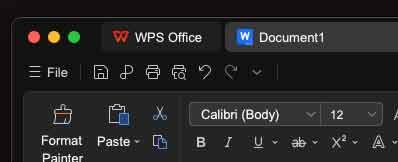
My search eventually led me to WPS Office, a productivity suite that includes a word processor, spreadsheet software, presentation tools and PDF functionality. I downloaded it, installed it and created an account when prompted at first launch. The interface felt familiar enough that I could begin working almost immediately. The commands and general organization of the application were sufficiently close to what I knew that switching did not require me to relearn the mechanics of writing. There were differences, of course, but they involved ordinary adjustments rather than a fundamental change in my workflow. I was not looking for a perfect replica of my previous software. I wanted to recover the continuity of work: the ability to open a document, concentrate on its contents and save it without having to think constantly about the application itself.
Saving files required a little more effort. I wanted to keep my documents in folders on my computer, avoid unnecessary duplicate copies and decide for myself when to create a PDF. A PDF is useful when a document must be distributed in a fixed format, but it is not a substitute for an editable working file, nor should creating one be an obligatory part of every save operation. WPS Office’s options took some getting used to, and I had to explore the menus before achieving the setup I wanted. Once I understood the process, however, I could save my work where I wanted it and in the formats I needed. My preferred font was available, formatting behaved as expected, and the essential functions worked. For all its apparent simplicity, that was the decisive test: could I get back to writing without the software becoming the story? In my case, the answer was yes.
The experience also forced me to reconsider how technological dependence develops. It rarely begins with an explicit decision to surrender one’s freedom of choice. More often, it emerges from habit, familiarity and the widespread adoption of particular file formats. Microsoft Office has become a de facto standard in businesses, government agencies, universities and professions built around the written word. Its formats circulate easily because so many people use them; their ubiquity, in turn, encourages still more people to adopt the same software. Word has become almost synonymous with word processing itself. This dominance rests on real strengths, including extensive functionality, integration with professional systems and the ability to handle complex documents. Organizations that depend on sophisticated spreadsheets, macros and elaborate templates cannot necessarily switch applications without significant disruption. But what makes sense for a large institution does not automatically make sense for an independent writer. A journalist, essayist, translator or author whose primary task is producing text may need only a fraction of the functions offered by a comprehensive office suite. The accumulation of features is not, by itself, evidence of better software.
The shift toward subscription-based services adds another dimension to the problem. Subscriptions can offer regular updates, online storage, collaboration tools and access across multiple devices. Microsoft also continues to sell certain versions of Office as one-time purchases, so it would be misleading to suggest that every user must subscribe. Nevertheless, recurring revenue has become central to the software industry’s business model. Applications are increasingly presented as gateways to continuing services rather than tools purchased and used on the customer’s own terms. For independent professionals, the financial consequences are cumulative. Hosting, backups, publishing platforms, communications tools and specialized services already generate recurring expenses. Each subscription may appear modest in isolation, but together they can consume a significant share of a working budget. The question is not whether paid software has value. It is whether users should have to pay continuously for services they neither need nor want simply to maintain access to basic working tools.
WPS Office offers a practical alternative for people whose requirements are relatively modest. Its free version provides core office functions, while certain advanced features, particularly some PDF capabilities and other premium services, are reserved for paid plans. It supports commonly used formats such as DOCX, XLSX and PPTX, making it possible to exchange many documents without requiring colleagues or clients to adopt the same application. That compatibility is important, but it should not be overstated. Complex layouts, macros, embedded objects and advanced spreadsheet functions may not behave identically across programs. Anyone working with technically demanding documents should test them before moving an entire workflow. For everyday writing, however, the barrier to switching may be considerably lower than users imagine. In my case, the free version already provided the tools I needed without requiring an immediate financial commitment.
I was also pleasantly surprised by WPS Office’s spell-checker, which seemed more useful than the one I had been accustomed to using. That is a personal assessment, not a universal ranking. Performance depends on language, settings and the nature of the document. No automated checker can replace an author’s judgment, and suggestions that improve a routine business document may flatten a literary sentence or distort a writer’s intention. For someone who works with words, the purpose of such a tool is to catch errors without interfering with the voice of the person writing. The software should support the author’s judgment, not substitute its own for it. Ultimately, the value of a writing application lies less in the number of features advertised than in how effectively it supports the work being done.
Nor should WPS Office be mistaken for an escape from every commercial constraint of the digital economy. The company operates a business, offers paid plans and provides online services, including account-based features and cloud synchronization. Free software does not mean a business model has disappeared. Users should examine privacy policies, understand which functions require an account or an internet connection, and distinguish local storage from online services. A file saved on a computer is not automatically secure: hardware fails, devices are stolen and data can be lost. Sensible local backups remain essential, whether or not cloud storage is used. The point is not to reject online services categorically, but to retain the ability to choose when they are useful. In my own work, I prefer to keep documents on my computer and decide when they need to be shared or transferred elsewhere. I do not need constant synchronization to write effectively.
This is a question of control, not nostalgia. Modern software often arrives with an expanding collection of panels, assistants, recommendations, artificial intelligence features and links to additional services. Some are genuinely useful; others add complexity to tasks that were once straightforward. The word “modern” is frequently invoked as though every new feature represents progress. Yet there is another, more practical measure of innovation: whether a tool allows people to do their work more easily. For a writer, an application that launches reliably, opens documents quickly, handles formatting and saves files correctly can be more valuable than one offering dozens of capabilities that will never be used. Writing requires concentration and continuity. Every unnecessary interruption breaks the thread of thought. The best software is often the software that knows when to get out of the way.
My experience with WPS Office has therefore changed how I think about software loyalty. I stayed with Microsoft Office because it was familiar, widely used and deeply embedded in the professional world. I had assumed that switching would be more trouble than it was worth. The breakdown forced me to test that assumption, and the transition proved easier than expected. WPS Office is not necessarily the best choice for everyone, and I have no reason to claim that it outperforms its competitors in every category. But for my writing, it has proved more than adequate. Its interface suits my habits, the formats I need are supported, and its free version covers the essentials. I have no reason to return to a system that no longer meets my expectations simply because it was the one I used before.
The broader lesson concerns the way market power can shape our technological choices. When a product becomes ubiquitous, its dominance can make alternatives appear riskier than they actually are. Users worry about compatibility, colleagues expect familiar formats, and years of established routines make experimentation seem costly. These are legitimate concerns, but they can also sustain dependence long after the original reasons for choosing a product have changed. Testing alternatives is one way to restore competition to a market in which familiarity can be mistaken for necessity. WPS Office is one option among several, including open-source applications and other commercial products. Choosing an alternative need not be an ideological declaration. It is simply a reminder that software companies must continue to earn their customers’ loyalty rather than rely on habit to preserve it.
Digital independence also requires more than changing applications. It means keeping backup copies, organizing files carefully, understanding the formats in which one works and avoiding dependence on a single provider for every aspect of one’s digital life. A sensible arrangement might combine a desktop word processor, specialized tools for particular tasks, a local backup and a separate copy stored securely elsewhere. The objective is not absolute independence, which is rarely practical, but resilience: ensuring that a single technical failure does not bring an entire working life to a halt. My experience with WPS Office made that principle tangible. It showed me that the alternative I had assumed would be difficult to adopt was already capable of meeting my everyday needs.
After three days spent trying to restore my previous software, I came away with a straightforward conclusion: no application should be treated as indispensable merely because it has become familiar. WPS Office will not resolve every problem in modern computing, and switching products does not eliminate the need for backups, security precautions or careful attention to compatibility. But it has restored something I had taken for granted: the ability to sit down at my computer and work without negotiating with the software first. For someone who makes a living through writing, that is no small achievement. In a digital economy increasingly organized around subscriptions, interconnected services and commercial ecosystems, the freedom to choose a simpler tool is more than a matter of convenience. It is a modest but meaningful way of reclaiming control over the conditions in which we work.
Thierry De Clemensat
French journalist Based in Austin, Texas, Writes on Jazz, Culture and Global Society
References
WPS Office — Official website, product overview and features:
https://www.wps.com/
WPS Office — Official downloads for desktop and mobile platforms:
https://www.wps.com/download/
WPS Office — Productivity suite, including Writer, Spreadsheet, Presentation and PDF tools:
https://www.wps.com/feature/productivity-suite/
WPS Office Academy — Overview of the software and its capabilities:
https://www.wps.com/academy/what-is-wps-office/about-wps/1863074/
WPS Office — Official pricing and comparison of available plans:
https://www.wps.com/buy/
WPS Office Help Center — Explanation of free and paid features:
https://help.wps.com/articles/why-do-i-need-to-pay-for-wps-office/
WPS Office — Privacy policy and information about data handling:
https://www.wps.com/privacy-policy/
Microsoft Support — Comparison of Microsoft 365 subscriptions and Office 2024 one-time purchases:
https://support.microsoft.com/en-us/office/lifecycle/lc-account/what-s-the-difference-between-microsoft-365-and-office-2024