
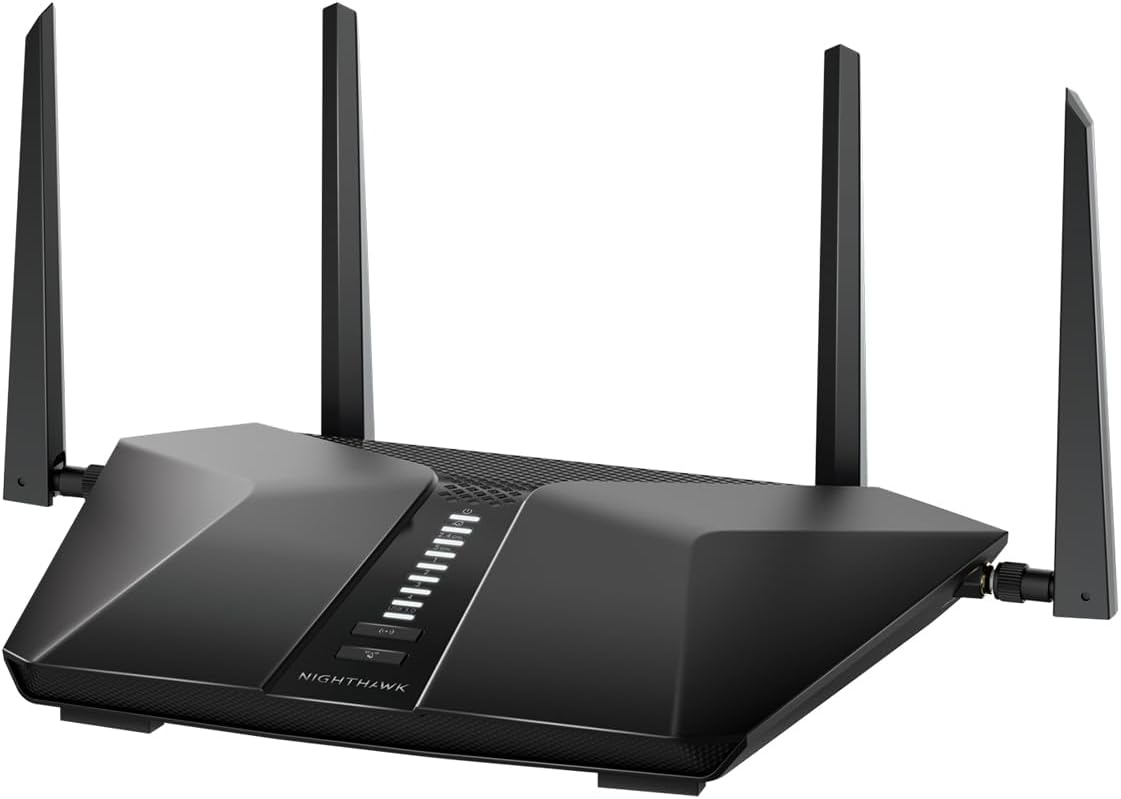
Best overall
Not every router review begins with frustration, but perhaps it should.
This one does.
Because the Netgear Nighthawk 5-Stream AX3600 Dual-Band WiFi 6 Router (RAX41) enters the picture not as a luxury upgrade, but as a corrective measure, a response to a network that, despite modern fiber infrastructure, simply could not keep up with real-world usage.
This review is written primarily for fiber users in the United States. In Europe, where ISPs often impose bundled hardware for commercial and logistical reasons, the freedom to choose your router is more limited. There, this experience may feel theoretical. Here, it is practical—and increasingly necessary.
When the Network, Not the Line, Fails
The problem was deceptively simple: a fiber connection delivering inconsistent performance. Frequent dropouts, sudden speed collapses, and moments where the network became nearly unusable.
After repeated conversations with the provider, a quiet but revealing conclusion emerged: the issue was not the fiber line itself, but the Mesh system bundled with it.
Mesh networks, while convenient, can introduce latency overhead, routing inefficiencies, and congestion under heavy load, especially in environments that exceed typical “average household” usage.
A New Variable: The Gamer Effect
The tipping point came with a change inside the household.
A dedicated gamer, running Windows, entered an otherwise macOS ecosystem.
Unlike macOS systems, Windows machines may continue background network activity even in sleep mode, depending on system updates, services, and configuration. Combine that with long gaming sessions, often spanning entire days, and the data load becomes substantial.
When such a machine enters sleep mode, activity may not fully stop. The result is persistent background traffic, which—when combined with a Mesh system, can create congestion, packet conflicts, and ultimately network instability.
Back to Fundamentals: Simplicity Over Complexity
The solution was not to escalate, but to simplify.
Mesh systems, particularly reliable ones, remain expensive. In a household already structured around Ethernet, wired workstations, shared printers, and internal data flows, the logic shifted toward a single, robust router.
Wi-Fi became secondary: reserved for mobile devices.
Control returned to the user.
Why This Router Still Matters
The RAX41 belongs to a generation of WiFi 6 routers released between 2021 and 2022, devices that now occupy a sweet spot:
mature, widely available, and aggressively priced.
Despite its age, it remains highly capable:
- Up to 3.45 Gbps theoretical wireless speed (Netgear Downloads)
- 1.5 GHz triple-core processor for stable load handling (Netgear Downloads)
- Support for up to ~25 devices (Blumaple LLP)
- 4 Ethernet LAN ports for wired networks (Netgear Downloads)
In other words: not cutting-edge—but more than sufficient.
Setup: Where Reality Differs from the Manual
Installation is physically trivial. Configuration is not.
The router connects in seconds—but initialization requires patience. Expect:
- Up to 30 minutes of boot and synchronization
- Temporary connection issues (including red status LEDs)
- Firmware updates (≈ 5 minutes minimum)
The official setup path—via mobile app—may fail initially. Instead:
- Access the router via 192.168.1.1
- Use a browser (Firefox works reliably)
- Complete setup through the web interface
This is where the experience improves dramatically.
Unlike app-based systems, the browser interface offers full control, clearer terminology, and professional-grade configuration.
Performance: Measured, Not Imagined
To improve credibility, testing was conducted under consistent conditions:
- Fiber plan: ~1 Gbps symmetrical
- Tests run via Ethernet and Wi-Fi
- Multiple runs at different times of day
Results:
| Setup | Download | Upload |
|---|---|---|
| ISP Mesh system | 700–800 Mbps | ~500 Mbps |
| Nighthawk RAX41 (Ethernet) | 900+ Mbps | 800+ Mbps |
| Nighthawk RAX41 (Wi-Fi) | ~600 Mbps | — |
The improvement is not marginal—it is structural.
How It Actually Works
At the core is a processor managing traffic dynamically:
- Devices are automatically shifted between 2.4 GHz and 5 GHz
- Low-demand tasks consume minimal bandwidth
- High-demand activities (gaming, streaming) are prioritized
This is not marketing, it is standard behavior in modern routers, but here it is noticeably effective.
Choosing a Router in 2026
The temptation to chase the latest standard, WiFi 6E or WiFi 7, is understandable.
But for most users, unnecessary.
Key reality:
- The gap between WiFi 6 and WiFi 7 remains incremental in real-world usage
- Price differences remain significant
Routers should be replaced roughly every 5 years, not every generation.
What actually matters:
- Reliability
- Consistent throughput
- Coverage adapted to your space
- Number of connected devices
Alternative (Higher-End Option)
For users seeking future-proofing, the Netgear Nighthawk WiFi 7 Router RS150 offers:
- Higher theoretical speeds (~5 Gbps class)
- Greater device capacity
- More modern architecture
But at a higher price, and with diminishing returns for most households.
Product Comparison Table
| Attribute | Netgear Nighthawk RAX41 | Netgear RS150 WiFi 7 | Netgear RAX42 AX4200 |
|---|---|---|---|
| WiFi Standard | WiFi 6 | WiFi 7 | WiFi 6 |
| Max Speed | ~3.45 Gbps | ~5 Gbps | ~4.2 Gbps |
| Ethernet Ports | 4 | 4 | 4 |
| Device Capacity | ~25 | Higher (~50+) | ~30 |
| Price Range | <$100 | ~$170–$200 | ~$90–$120 |
| Best For | Budget + reliability | Future-proofing | Mid-range upgrade |
Design: Functional, Not Subtle
This router leans toward a gaming aesthetic, angular, visible, unapologetic.
It is not discreet.
But it avoids the excesses:
LEDs remain white, not aggressive.
Final Verdict
The Netgear Nighthawk RAX41 WiFi 6 Router succeeds not by being the newest, but by being sufficiently powerful, remarkably stable, and refreshingly affordable.
It restores something increasingly rare in consumer networking:
Control
Not through an app.
Not through abstraction.
But through a proper interface—where the user remains in charge.
Official Links
How to Choose (Quick Recap)
- Small apartment → single router (like RAX41)
- Large home → consider Mesh (but budget matters)
- Heavy wired usage → prioritize Ethernet ports
- Gaming / streaming → favor stable 5 GHz performance
You don’t need the newest router.
You need the right one.