
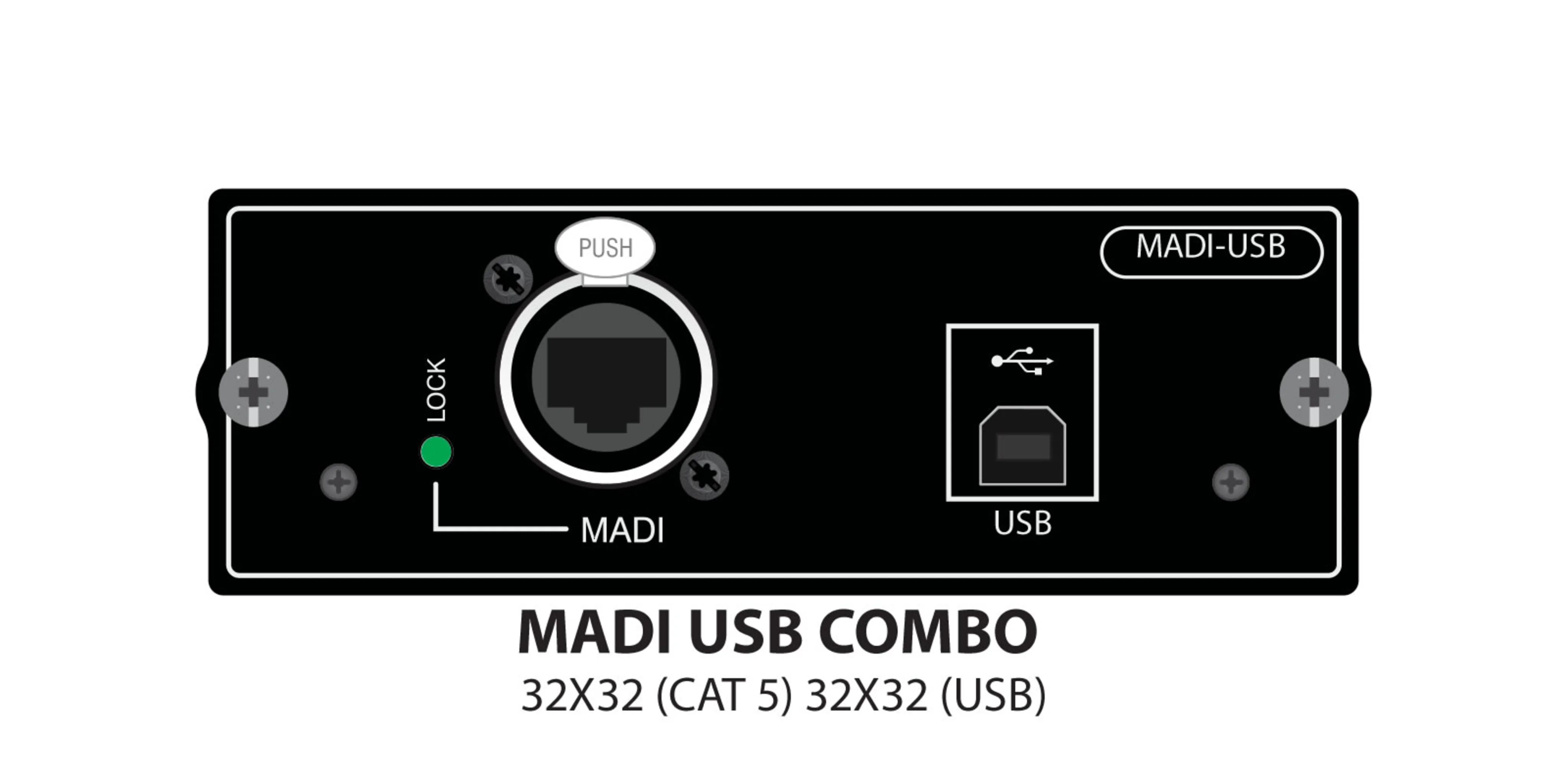
There is a persistent contradiction in the professional audio industry, one that marketing language tends to obscure behind impressive specifications, promises of versatility and assurances of uncompromising sound quality. A piece of equipment can be exceptionally well designed, offer extensive technical capabilities and meet the demands of serious audio production, yet fail at one of the most basic tasks for which it was purchased. The MADI-USB card supplied with the Soundcraft Si Impact digital mixing console is a case in point. My experience with this equipment has led me to a decidedly unfavorable conclusion: in my view, the card represents one of the most disappointing industrial failures a buyer can encounter when investing in a console of this class. The problem is not that MADI technology is obsolete or unsuited to professional audio. It is that the reliability of the interface connecting a mixing console to a computer is fundamental to the entire system. A digital console may offer dozens of channels, sophisticated processing, multiple auxiliary buses and an elaborate routing architecture, but if its connection to a recording computer is unpredictable, much of its practical value is compromised.
The Soundcraft Si Impact is hardly an underachiever. Its architecture supports a wide range of sources and complex mixing configurations, making it suitable for applications ranging from live performance to radio production and multitrack recording. The manufacturer’s documentation describes a console offering extensive mixing capabilities, built-in processing and a USB-based recording workflow. The MADI-USB card is designed to transfer up to 32 audio channels in each direction over USB at 48 kHz, while providing additional digital connectivity options. On paper, the combination is compelling: a relatively compact digital console, a substantial set of professional features and an integrated interface intended to simplify the transfer of audio to a computer. That integration should be one of the product’s principal selling points. It eliminates the need to purchase another interface, reduces cabling and promises a more straightforward recording setup. But technical specifications and marketing promises ultimately mean little if a product cannot deliver consistently in everyday use. That is where the gap between the console’s theoretical capabilities and my own experience becomes difficult to overlook.
From the outset, I encountered the same kinds of problems that numerous users have described online. These were not minor configuration issues that could be resolved by consulting a manual or changing a few settings. The card behaved unpredictably. Sometimes the computer recognized it; at other times, it did not. On some occasions, it stopped functioning in the middle of a recording. That last failure is particularly troubling. An audio interface may lack certain conveniences, offer limited functionality or require compromises in the way a recording session is organized. Such limitations are manageable when they are understood and consistent. An interface that unexpectedly disappears is an entirely different matter. It introduces uncertainty into a process that depends on continuity, stability and predictability. When preparing a radio program, recording a rehearsal or capturing a concert for broadcast, the equipment is supposed to serve the work. The operator should not have to wonder whether the connection will remain functional for the next few minutes.
Before concluding that the card was unusable in my setup, I followed a methodical troubleshooting process. I updated the mixing console itself, proceeding step by step, and then updated the MADI-USB card using the recommended versions. The purpose was to eliminate the most obvious potential causes: outdated software, version conflicts, incomplete installations or incorrect configuration. Despite these precautions, the problems persisted. The card might be recognized during one session and fail to appear during the next. It could also stop working while a recording was underway. At that point, repeating the same maintenance procedures was no longer a satisfactory response. This is not to suggest that computer-based audio systems are never sensitive to hardware or software environments. It is simply to acknowledge that the standard precautions expected of a technically competent user did not produce the reliability I needed. I cannot claim that every MADI-USB card suffers from these problems or that every computer configuration will produce the same results. I can, however, describe my own experience and the impasse it created: despite the updates and troubleshooting, I could not achieve the stability required to trust the interface.
Perhaps the most revealing aspect of this experience is how modest my requirements actually were. I do not use the Soundcraft Si Impact primarily for elaborate multitrack recording. Its main purpose in my setup is radio production and live work, situations in which a properly controlled stereo output is often all that is required. I did not need to exploit the card’s maximum channel capacity or transfer dozens of individual tracks to a digital audio workstation. I simply needed a reliable stereo connection between the console and the computer. Problems with an especially complicated recording configuration are one thing. Having to abandon an integrated interface to accomplish such a routine task is quite another. The disproportion between the sophistication of the equipment and the inadequacy of the result is what makes the experience so frustrating. The technology itself is more than capable. The console already has the tools needed to process and mix the audio. The failure lies in the component that is supposed to make those capabilities readily available to the computer-based recording environment.
The solution I eventually adopted is almost paradoxical in its simplicity. Since I needed only a stereo signal, I connected a Focusrite Scarlett 2i2 to the Soundcraft’s auxiliary outputs. This considerably less expensive interface immediately fulfilled the purpose for which I needed it. Where the integrated card had forced me through repeated checks without providing dependable operation, the Focusrite restored a straightforward and consistent workflow. The principle is simple: the signal is processed and mixed on the Soundcraft, then sent to the external interface, which handles the conversion and transfer to the computer. The arrangement is less integrated, but it meets the actual requirement. There is an important distinction, of course. The Scarlett 2i2 cannot replace a MADI interface capable of carrying dozens of independent channels. It is therefore not an equivalent solution for anyone who needs to record every track separately. For stereo radio production, demos or concert recordings intended for broadcast, however, it can be a far more rational alternative, provided the console offers suitable outputs and the signal levels are correctly configured.
The financial contrast is equally striking. At the time of my experience, I regarded the Soundcraft MADI-USB card as a roughly $500 piece of equipment, while the Focusrite Scarlett 2i2 cost less than $200. Prices vary by generation, market and date, so these figures should not be treated as a universal price comparison. The difference is nevertheless substantial enough to raise a basic question: what is the point of a more expensive integrated interface if it cannot reliably perform the function the user needs? In the professional equipment market, a product’s price reflects more than its components and theoretical performance. It also reflects the promise of coherent integration, fewer complications, dependable operation and peace of mind. A less expensive solution with fewer inputs and outputs can prove superior in a particular setting if it allows the work to proceed without interruption. This does not establish that the Focusrite is universally superior to Soundcraft’s card. It demonstrates something more practical: a simpler device can be the better tool when its capabilities match the task at hand.
There is, however, another option for those prepared to invest more heavily in their audio systems and build a more sophisticated production environment. The RME Babyface Pro FS, available from retailers such as Sweetwater, is a high-end USB audio interface worth considering for demanding applications. Its appeal rests in part on its conversion capabilities, clocking specifications, flexible routing and the extensive control provided by RME’s TotalMix FX software. It offers analog inputs and outputs, along with optical digital connectivity configurable for ADAT or S/PDIF. This makes it suitable for integration into more elaborate studio systems and, with the appropriate external converters, for expanding the available input and output capacity. Its cost is considerably higher than that of a basic stereo interface, but the investment may make sense when routing flexibility, expansion options and the overall quality of the audio chain become priorities.
There is, however, an important technical qualification that should guide any purchasing decision: the RME Babyface Pro FS does not have a native MADI input. It therefore cannot connect directly to the Soundcraft MADI-USB card and correct any faults in that card’s operation. Buying the RME does not guarantee that the Soundcraft interface will suddenly become reliable. The Babyface Pro FS can instead serve as an external interface for capturing the console’s stereo mix, or become part of a more elaborate digital audio system when the necessary equipment and connections are provided. Anyone wishing to retain a MADI multichannel workflow must first determine precisely how the signal will be routed and what additional hardware will be required to convert it into a format the RME can accept. Such an investment may be worthwhile over the long term for a studio or control room with more demanding requirements, but it should not be confused with a direct repair or replacement for the Soundcraft card. The price of professional equipment does not eliminate the need to understand its architecture. Even a highly regarded interface cannot perform a function for which it lacks the necessary connectivity. For users who simply want to record a stereo radio program, the Focusrite is likely to remain the more sensible choice. For those building a more comprehensive system, the RME is a serious contender, provided the entire signal chain is designed accordingly.
It would nevertheless be unfair to reduce the Si Impact to this failure. Indeed, the console’s strengths are precisely why my criticism of the card is so severe. Its mixing capabilities, bus architecture, built-in processing and flexible organization make it a valuable tool for radio production and live sound. It would be unreasonable to advise users to avoid the console altogether simply because my experience with the MADI-USB card was negative. The distinction matters. Serious criticism should identify the component that compromises a product’s usefulness and determine whether a practical alternative exists, rather than condemn every aspect of the equipment indiscriminately. I continue to regard the Soundcraft Si Impact as an excellent digital mixing console. Its genuine strengths make it all the more disappointing that its potential can be undermined by an interface I could not get to operate as expected. The good news is that, for certain applications, this weakness can be worked around without abandoning the console itself.
The experience also raises broader questions about how manufacturers design digital equipment. Integration is routinely presented as progress in itself. A mixing console with a built-in computer interface appears more modern, convenient and complete than a system that requires an additional device. But integration is an advantage only when the components work together reliably over time. Otherwise, it can become a form of technical dependency: the user owns a device fully capable of processing audio but remains reliant on a specific module to communicate with a computer. Software compatibility then becomes central to the product’s long-term usefulness. The manufacturer documents transfer capabilities, provides installation instructions and makes software or drivers available. The user, meanwhile, expects a practical result. The expectation is simple: open a session, connect the equipment and get to work. When actual performance falls short, the burden of resolving the problem shifts toward the customer, who must check software versions, search for other users’ experiences and experiment with workarounds. That transfer of technical responsibility is especially disappointing when the equipment is intended for professional use, where wasted time carries a cost and reliability is a basic requirement rather than a luxury.
The manufacturer’s documentation provides another important consideration. Soundcraft’s compatibility information for the MADI-USB card lists Windows 7, Windows 8 and Windows 10, as well as older versions of macOS, from Lion through El Capitan. Those specifications do not establish the cause of the problems I experienced. Nor do they prove that all newer computers are incompatible with the card. They do, however, make software compatibility an issue that deserves careful attention, particularly when equipment was designed at a time when operating systems, drivers and computer architectures were evolving differently. For anyone buying used equipment or seeking to extend the life of an existing console, the question is not simply whether the hardware remains in good physical condition. Its dependence on software and drivers also matters. An interface whose support for current operating systems is unclear can become a source of complications regardless of its underlying audio capabilities. Buyers should investigate that issue before making a purchase, without automatically assuming that software incompatibility explains every reported failure.
For users like me who rely on the Soundcraft Si Impact primarily for radio, live production or stereo recordings intended for broadcast, an external interface deserves serious consideration. The Focusrite Scarlett 2i2 is my first choice for this particular application because its compact design, two inputs, two outputs and straightforward operation suit a relatively modest set of requirements. The Solid State Logic SSL 2 MKII is another option for those looking for a compact interface with quality preamps, balanced outputs and monitoring features suited to studio work. The Yamaha AG06 is also worth considering on the used market, particularly for users who prefer a small USB mixer designed for streaming, podcasting and content production. Yamaha has discontinued the original AG06, however, so buyers should distinguish it from the AG06MK2 and verify driver availability and operating-system compatibility before purchasing. These products are not interchangeable in every setup. Each has its own layout, connections and limitations. The decision should be driven by the actual work to be done, not by a race to accumulate specifications.
It is important to remember that a stereo interface cannot replace a genuine multichannel connection when a project requires one. An engineer who wants to record the individual microphones on a concert, revisit each instrument later and perform a detailed mix will need a system capable of transporting the required number of independent channels. The Scarlett 2i2, SSL 2 MKII and AG06 are not direct substitutes for a multichannel MADI connection. They become useful when the mix is prepared on the Soundcraft and the stereo result is recorded. The RME Babyface Pro FS offers a different, more expandable approach, but it does not provide a native MADI input either. This distinction prevents misleading comparisons. The point is not to pit a two-channel interface against a system capable of carrying dozens of channels, but to determine which solution best serves a particular task. For a radio program, a live broadcast, a musical demo or a concert intended for stereo distribution, a simple interface may be entirely sufficient. For demanding multitrack production, it will not be enough without an appropriately designed additional system. The objective is to avoid paying for capabilities that will never be used while also avoiding dependence on a theoretically powerful feature that cannot meet the practical demands of the job.
My conclusion is therefore twofold. On the one hand, the Soundcraft Si Impact remains an impressive digital console, offering substantial capabilities and the flexibility to accommodate a variety of working environments. On the other, my experience with its MADI-USB card was sufficiently negative that I would advise prospective buyers not to rely on it without first verifying its compatibility and operation in their own computer configuration. An individual account cannot serve as a universal technical verdict on every unit, but it can explain why I ultimately abandoned this solution and why I believe equipment at this price level should deliver reliability commensurate with its professional positioning. The experience also reinforced a simple principle that is too often overlooked in the professional audio business: sophistication is not an end in itself. A technically modest solution that fits the application and works consistently can be far more useful than a more ambitious system that proves unreliable. If your Soundcraft Si Impact is used primarily for radio, live work or stereo concert recording, I would seriously consider the Focusrite Scarlett 2i2, the SSL 2 MKII or, on the used market, the Yamaha AG06. If you want to invest in a more ambitious setup, the RME Babyface Pro FS also deserves consideration, provided you understand that it does not directly resolve the Soundcraft card’s problems and has no native MADI input. In my case, using an external interface allowed me to preserve the strengths of the console while working around what I consider its most regrettable weakness. It is a pragmatic solution, but it should not obscure the underlying issue: when a manufacturer integrates an interface into professional equipment, that interface’s reliability should be treated as an essential part of the product, not as a secondary detail the customer is left to resolve.
Thierry De Clemensat
French journalist Based in Austin, Texas, Writes on Jazz, Culture and Global Society
References
Soundcraft, Si Impact, official product information and specifications for the console and its mixing and recording capabilities. https://www.soundcraft.com/en-US/products/si-impact/1000
Soundcraft, Si Option Cards, official documentation on expansion cards, the MADI-USB Combo card and listed operating-system compatibility. https://www.soundcraft.com/en-US/products/si-option-cards
Soundcraft, Si Impact User Manual, section covering the MADI-USB card, its audio-transfer capabilities, configuration options and computer connectivity. https://www.soundcraft.com/en-US/product_documents/siimpactusermanual_v1-4_screen-pdf
Focusrite, Scarlett 2i2, official product information and technical specifications for the USB audio interface. https://us.focusrite.com/products/scarlett-2i2
Solid State Logic, SSL 2 MKII, official specifications for the USB audio interface. https://solidstatelogic.com/products/ssl-2-mkii
Yamaha, AG06, official specifications for the original model and information on its discontinued status. https://usa.yamaha.com/products/music_production/interfaces/ag_series/specs.html
RME, Babyface Pro FS, manufacturer’s technical documentation covering analog inputs and outputs, optical ADAT/S/PDIF connectivity and digital specifications. https://archiv.rme-audio.de/download/bface_pro_fs_e.pdf
Sweetwater, RME Babyface Pro FS, product information and retailer specifications. https://www.sweetwater.com/store/detail/BabyfaceProFS–rme-babyface-pro-fs-24-channel-usb-audio-interface
Manufacturer documentation establishes advertised capabilities, connection options and stated compatibility. It does not, by itself, establish the frequency of failures involving the MADI-USB card. The intermittent recognition problems and recording interruptions discussed in this article reflect my personal experience and the user reports to which I refer; they should be distinguished from official product specifications.